where do the bytes go?
01 / 14
swiftCon 2026 · Berlin · 20 minutes

Where do
the bytes go?

Making iOS app growth observable at scale.

By Jan Rabe: technical team lead for CHECK24's native apps for six years, now lead developer (full-stack web). A 20-minute talk from swiftCon 2026 about making iOS app size explainable: which module, which file, which owner, on every build. The examples come from two real apps. Module, team, vendor, and file names are anonymised.

CHECK24 · iOS · release 2026.38

195.5MB

4.5 MB below the 200 MB cellular prompt.

Wrong number. Wrong question.

caliper report · Release · iphoneos02

Our comparison app's IPA is 195.5 MB. It looks like it's 4.5 MB from the point where iOS asks before a cellular download. It isn't. The IPA is not what a user downloads. And "how big?" is the wrong question anyway. The useful question is "whose bytes, and since when?"

calibration · 60 seconds

Three numbers wearing one name.

IPA · compressed
195.5 MB

Universal archive. Every slice, every scale. Nobody downloads this.

what CI can measure on every build
installed · on disk
409.0 MB

Unzipped. The binary grows 2.6×; asset catalogs barely move.

what "storage full" feels like
per device · thinned
App Thinning
Size Report

Apple's ground truth for how much. Signed export. Not who.

what the 200 MB prompt checks

Pick one. Write it down. Never compare across. (Not even across platforms.)

today: IPA bytes of a Release device build · same metric, every build03

"App size" means three different numbers. The compressed IPA (195.5 MB) is universal and nobody downloads it as-is. The installed size (409 MB) is what sits on disk. The per-device thinned size comes from Apple's App Thinning Size Report, and it is the number the App Store's cellular prompt cares about. This talk uses IPA bytes of a Release device build, because CI can measure them on every build. The same app on Android reports 119.2 MB download for one device spec. That is a different question, not a smaller app.

195.5 MB, joined across four artifacts

The IPA already knows.

compressed bytes inside the IPA2,397 files · 1,659 modules
unzip -v App.ipaevery file · compressed vs. installed
xcrun assetutil --info Assets.carevery rendition · scale · appearance
LD_GENERATE_MAP_FILE = YESevery symbol → object file → module
module-ownership.ymlthe one file Xcode can't write
three ship with Xcode · the fourth is a YAML file, and the hardest to write04

The 195.5 MB IPA splits into one statically linked app binary (89.6 MB, 46%), 63 asset catalogs (69.2 MB, 35%), dynamic frameworks (22.4 MB), ML models (7.9 MB) and the rest (6.4 MB). The build already holds the attribution. unzip -v lists files, assetutil --info opens Assets.car, the LinkMap (Write Link Map File = YES) maps every symbol to a module, and an ownership file maps modules to owners.

flashback · our smaller app · 2024

We've been here before.

the number
95 MB

Five feature teams, one shared core. Every team: "not us."

the join
86%

of the app in one shared module. 96% of that module: images.

the fix
21.6 MB

About six weeks of releases. Nobody rewrote any Swift.

The biggest Swift problem in that app was a tutorial.

IPA size · releases 2023.51 → 2024.4 · −77%05

This has happened before, in our smaller app in 2024. It was 95 MB, and 86% of it sat in one shared module, 96% of which was images. Unbundling, reuse, and deletion took it to 21.6 MB across about six weeks of releases, without rewriting Swift. The biggest single culprit: huge tutorial images bundled into the app. Shown once, on first launch, and downloaded by every install.

the big app · first-party modules · installed bytes

Same tool. Opposite answer.

Swift code (LinkMap)images (Assets.car)% = code share
2024 · smaller app · shared core
4% code · 96% images
2026 · big app · main binary
214 of 230 MB is our own Swift · grey: vendors, linker

This time, the problem is us.

77 first-party modules · top 10 = 63% of their bytes · 45 are under 1 MB06

In the big app, the largest first-party modules are 62–96% compiled Swift, not images. 214 MB of the 230 MB installed app binary is our own code. The 2024 playbook (find the image, unbundle it) doesn't carry over. The method does: join the artifacts and look before you guess. Ten of 77 modules hold 63% of first-party bytes.

still: the attic is never empty

What the report found in September.

4.84MB

one Instagram icon. A gradient SVG. The largest image in the app.

Dec2025

a Christmas promo logo, 1.33 MB, still shipping in September 2026.

6×

Black Friday artwork across 3 modules. 1.6 MB, all year round.

3×

the same photo of a dog, in three modules. Good dog. Three times.

211

asset names that ship in two or more modules. 6.4 MB.

23

images over 250 KB hold 17.2 MB. 0.6% of 3,598 renditions.

gradient SVG → rasterizeshown once → load remotelyseasonal → never in the bundle boring fixes. on purpose.
none of these are bugs · each was a reasonable decision, made alone, without the total07

Even in a code-heavy app, the asset catalogs hold surprises: a 4.84 MB Instagram gradient icon (the largest image in the app), a December 2025 promo still shipping in September 2026, Black Friday artwork in three modules, the same dog photo three times, 211 asset names duplicated across modules, and 23 images holding 17.2 MB. None of these are bugs. Each one is a local decision made without seeing the total. The fixes are boring: an SVG with gradients is still an image, and gradients make SVGs huge, so rasterize it and load it remotely. Anything shown once, and any seasonal artwork, doesn't belong in the bundle.

back to 2024 · what happened next

95 → 21.6 MB. Then nothing.

the project the system 0255075100 95 21.62 20.1 a year later 2023.512024.2.12024.42024.52025.10

The drop was a project. The flat line is a system.

smaller app · IPA size per release · versions are year.week08

The smaller app dropped from 95 MB to 21.6 MB, and a year later it was at 20.1 MB despite weekly feature work. The drop was a project. The flat line is a system. In the big app, 77 modules and 55 owners rule out a one-off cleanup. Only the system scales.

system · part 1 · who

The hardest file isn't Swift.

# module-ownership.yml · first match wins
- identifier: "ProductA"
  owner: Team A
  internal: true
# satellites carry their product's owner
- identifier: "ProductAManifest"
  owner: Team A
  internal: true
# vendors get an owner, too
- identifier: "VendorSDK*"
  owner: Vendor X
# Apple catch-alls go last
- identifier: "*.tbd"
  owner: Apple
1,659modules
120rules
0unowned
A number without an owner is a weather report.
"The app is 195.5 MB."weather
"Team A: +2.95 KB since last release."conversation
a new module needs one entry · nothing else changes · ordering is the API09

Module names aren't team names. An ordered YAML file (first match wins, specific above generic, Apple catch-alls last) maps 1,659 modules to owners with 120 rules and zero unowned modules. Product satellites carry their product's owner, and vendors get an owner too. Once size has an owner, "195.5 MB" stops being a weather report and becomes a conversation.

system · part 2 · when · what we run today

Every release. Every module. A diff.

#module · ownersizeΔ release
1Product ATeam A12.09 MB+2.95 KB
2Product BTeam B9.89 MB+744 B
3Product CTeam C7.61 MB−12.33 KB
9Shared corePlatform5.62 MB+71.42 KB
…57 product modules
✓Attributable. Every row has an owner.
✓Comparable. Same metric, every release.
✗Late. The change merged a week ago.
✗Nobody's PR. A delta without its author.

The dashboard tells you who.
It doesn't tell you when you could still say no.

anonymised · release 2026.38 · internal size dashboard10

Today the big app has a per-release dashboard: every product module, its owner, its size, and the delta since the previous release. That makes growth attributable and comparable. But it arrives a week after the merge, and the delta has no pull request attached. The next step is to move the same diff into the pull request.

system · part 3 · where we're going

Ask again on every pull request.

01archiveRelease · iphoneos · LinkMap on
02caliperreport.json · report.html
03diff vs. mainlast green report.json
04PR commentΔ · top movers · owner
# .github/workflows/size.yml · macOS runner
- uses: kibotu/caliper@1.5.4
  id: size
  with:
    ipa-path: build/App.ipa
    link-map-path: build/App-LinkMap-normal-arm64.txt
    ownership-file: config/module-ownership.yml
- run: scripts/size-delta.sh main.json \
       ${{ steps.size.outputs.report-json }}
policy, not magic

baseline + delta + owner

+ an explicit "yes, on purpose, because…"

A red build without an owner
is a ceremonial failure.

no signing needed to measure · caliper gives you JSON · the diff policy is yours11

Next: run the same analysis on every pull request. Archive an unsigned Release build with the LinkMap enabled, run Caliper (a GitHub Action exists), diff report.json against main, and post the delta, the top movers and their owners on the PR. Policy: baseline + delta + owner, plus an explicit way to accept intentional growth. No magic byte limit.

by the way · 30 seconds

Your Android colleagues will ask.

iOSCaliperIPA · LinkMap · Assets.car · 195.5 MB
AndroidRuler forkAAB · one device spec · 119.2 MB
plugins { id("net.kibotu.ruler") }

$ ./gradlew analyzeReleaseBundle
→ build/reports/ruler/release/report.{json,html}

Same app. Same report. Different question.
Compare each platform with itself.
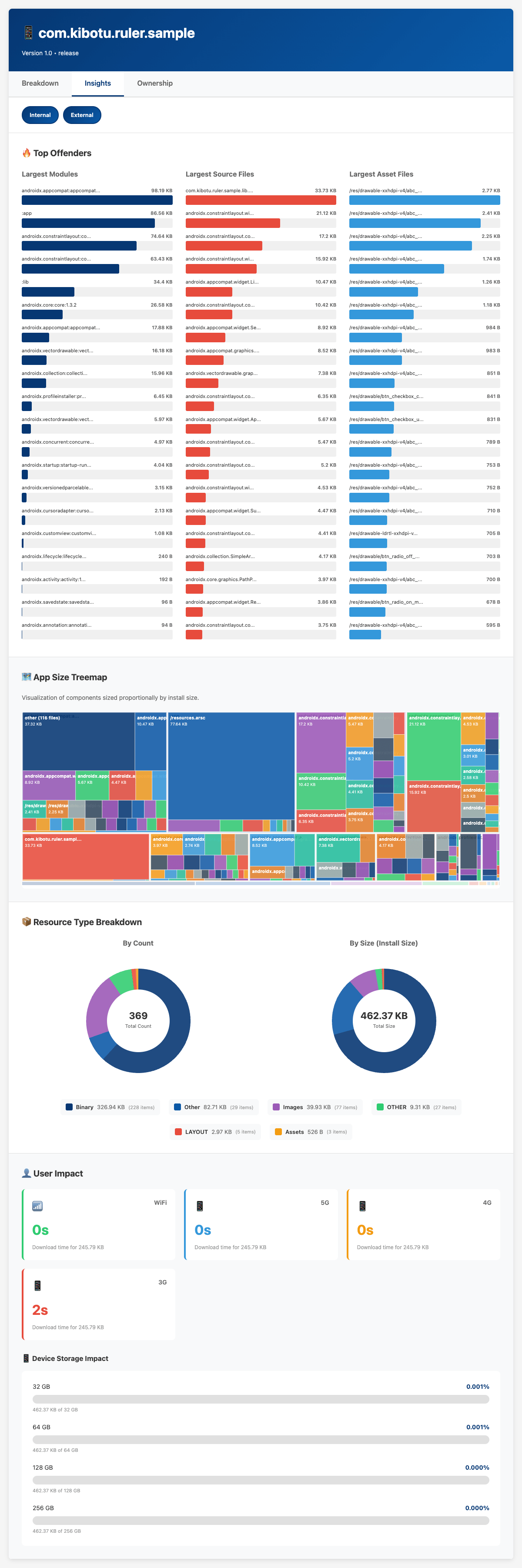
report.html · Ruler sample
Ruler Insights tab for a sample Android app: top offenders by module, source file and asset
Spotify's Ruler inspired Caliper · Spotify stopped maintaining it · so I forked it12

For Android, a maintained fork of Spotify's Ruler writes the same HTML report, so one dashboard can read both platforms. The same app reports 119.2 MB on Android for one device spec and 195.5 MB as a universal IPA. Those numbers answer different questions. Compare each platform only with itself. github.com/kibotu/ruler

where this stops working

What I don't know yet.

  1. Where 214 MB of Swift goes.Generics, Codable, value types, SwiftUI? The LinkMap knows. I haven't asked it well enough yet.
  2. 76% of our image bytes are SVG.How many more are secretly bitmaps? Should CI flag every SVG with a gradient?
  3. Per-device numbers in the PR.The thinning report needs a signed export. Worth the CI minutes?
  4. Background Assets.Apple-hosted asset packs: should seasonal art leave the bundle entirely? Probably.
  5. The right budget.I don't believe in one number. Growth per feature? Per owner? Tell me.
solved one of these? find me afterwards. I mean it.13

Open questions: what makes the first-party Swift so large (generics, Codable, value types, SwiftUI); how many of the SVGs (76% of the image bytes) are really bitmaps in disguise, and whether CI should flag every SVG with a gradient; whether per-device sizes belong in every PR; whether Background Assets should host seasonal artwork; and whether any single size budget makes sense. Answers welcome.

Measure the artifact. Name an owner. Ask again on every build.

Monday: take your last Release IPA. Write down its top three contributors, and who owns them.

Jan Rabe · CHECK24 · thank you14

Slides: kibotu.github.io/swiftcon-presentation-caliper. Homework for Monday: take your last Release IPA and write down its top three contributors and who owns them. Measure the artifact. Name an owner. Ask again on every build.